INTERACTIVE OCCLUSION TEACHING

Teach the contact.
Explore the consequence.

Give students a clinical question they can work through: examine a contact, make a guided adjustment and recheck what changes.

BiteWise3D · Interactive occlusion learning · Runs in a browser

1:45 · Narrated & captionedSimulator footage + Studio concept
Transcript, recording details & simulation limits

Explore normal occlusion, composite adjustment and working-side and non-working interference through simulator recordings. The final sequence illustrates the Studio faculty workflow and is labelled as a concept. Narration and visible captions are included; pause or use fullscreen to inspect a step. Paper colour illustrates simulated contact, not bite force. This is an educational model, not patient-specific treatment guidance.

Read the full transcript

Watch the actual simulator: contact marking, inspection and guided adjustment. No sign-in needed to watch.

Immersive + interactive Explore the simulator today.Faculty customization Explore the Studio concept preview ↗

TWO WORKSPACES. ONE TEACHING VISION.

For students.
For faculty.

Explore the student experience in BiteWise3D and the faculty authoring vision in Studio, together in one place.

STUDENT WORKSPACE · AVAILABLE TODAY

BiteWise3D

Explore occlusion in motion.

Explore how teeth meet and how jaw movement changes their contacts. Investigate interferences, practise guided adjustments and recheck the result, connecting observation with clinical reasoning.

FACULTY WORKSPACE · CONCEPT PREVIEW

BiteWise3D Studio

Bring your own teaching questions.

Explore the design for case configuration, faculty-written questions and feedback. Studio is not yet available for faculty use; the demo covers the current simulator and an authoring preview.

Register for access updatesExplore the Studio preview →

Evaluating for a course? Review access, classroom evaluation and current limitations →

AN EXAMPLE LESSON · MODULE 2

A high restoration.
A decision to explain.

For learners studying occlusion and restorative dentistry. Use the composite hyperocclusion scenario on tooth 16 alongside your own instruction.

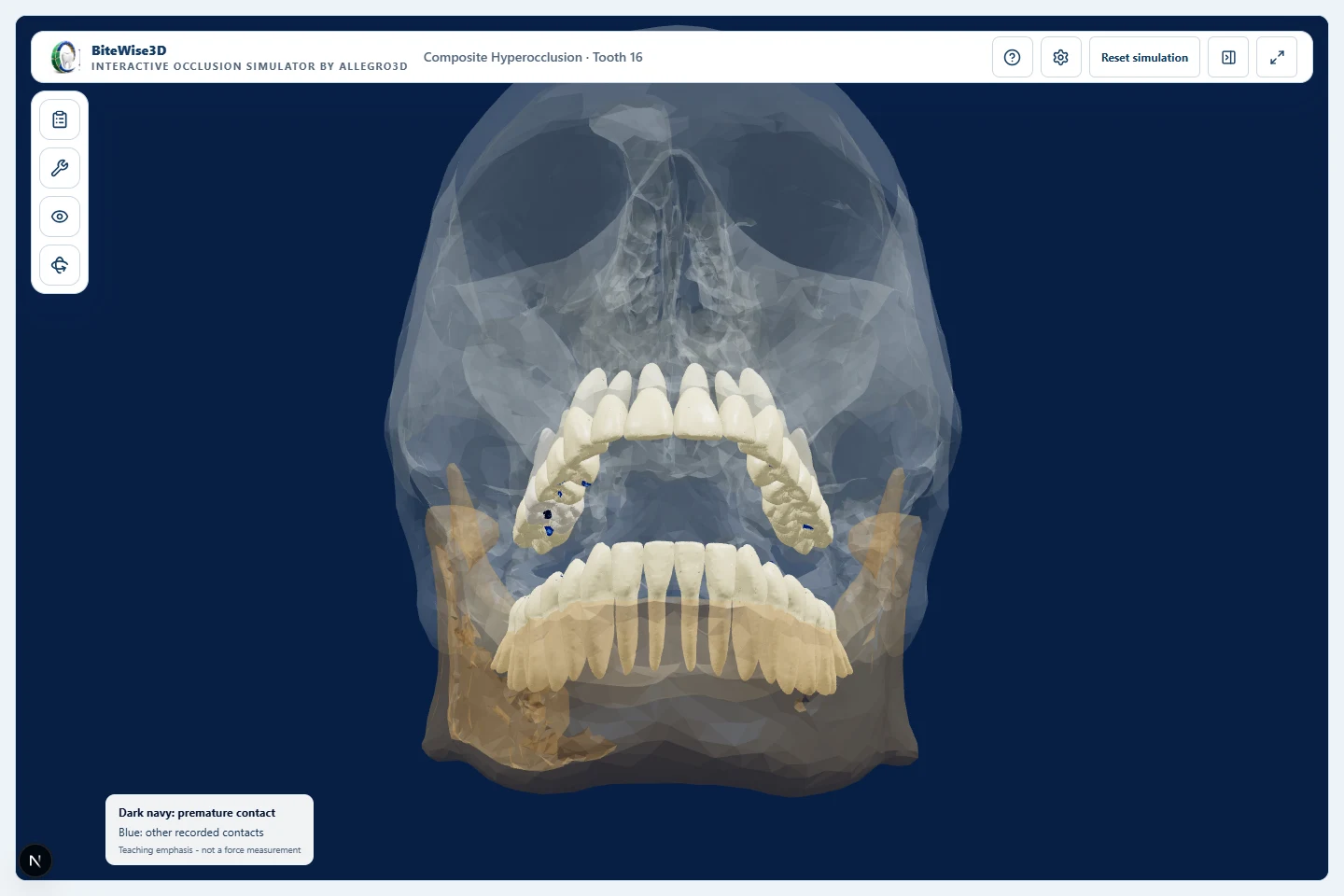
Actual simulator view: an open jaw with recorded contact marks on the upper teeth in the tooth 16 hyperocclusion scenario.
Actual Module 2 view · Simulated contact marks, not force measurements.

“What would you adjust, and what would you check afterward?”

  1. Mark & inspectRecord the simulated contacts, then open the jaw to examine them.
  2. Explain & adjustAsk the learner to justify a choice before making a guided adjustment.
  3. Recheck & discussRepeat the movement. Compare the result and discuss whether further adjustment is needed.

Teaching objective: practise explaining an adjustment decision using observations before and after rechecking. Faculty evaluate the reasoning; this is not a validated competency assessment.

Explore the learning scenarios →

LET’S TALK ABOUT YOUR COURSE

See one case. Judge the teaching fit.

We’ll walk through a clinical exercise, explore the learning scenarios and discuss where they fit in your course. Studio authoring is a separate concept preview.

Request a faculty demoWe’ll contact you to arrange a convenient time.
Review us onTrustpilot (opens in a new tab)